

I have been using Whoop, a wearable health and fitness tracker, for around six months and it is time to share some thoughts about what it is good for and what it offers that other products may not. But let me say at the outset that if I were to recommend Whoop – and it’s a qualified yes – it’s not for everyone. I was a bit skeptical initially, but I have grown to really value the insights it provides.
I started out using Whoop 4.0, which was introduced in 2021. In May 2025, Whoop 5.0, the long-awaited upgrade that brings in Whoop’s fifth generation of hardware, was announced, along with a new device called the Whoop MG, where MG stands for Medical Grade.
For a long time before trying it, I figured Whoop was a good option for Apple Watch users to understand their level of recovery and readiness to train – things that users of Garmin and other brands of sports watches typically get for free. However, with Apple beginning to offer new health insights, I started to wonder if Whoop’s reason for being would be undermined. But the new updates in the 5.0 and MG will have given it more breathing room.
Whoop – what is it?
Whoop is a system that uses a Whoop wearable device, a set of sensors similar to those in most smartwatches and smart rings. Unlike a watch, but much like a ring, it doesn’t have a display. As standard, you wear it on a wrist, but there are alternative straps and accessories available to enable it to be worn on the upper arm, or even in items of clothing such as swimsuits, cycling shorts and underwear.

The other parts of the system are the application and the cloud backend, where data is processed and recommendations developed.
Whoop uses a membership model, where the hardware is included as part of the annual subscription cost.
The Whoop device
The device tracks heart rate and movement through a set of optical sensors, accelerometers and gyroscopes to assess what level of stress you are putting on your body. Whoop also measures blood oxygen levels and skin temperature. In addition, the MG device offers a heart screener with ECG, notifications about irregular heart rhythms, and a guide on blood pressure. More on the latter in a minute.
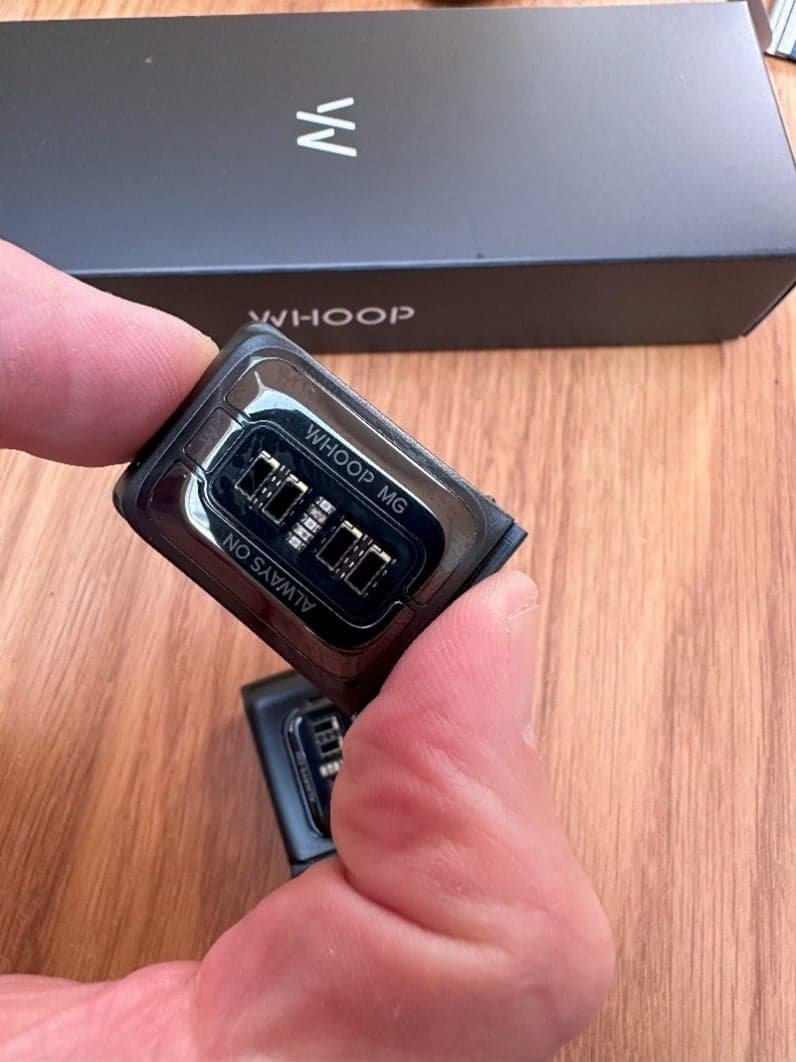
The device is designed to be worn 24/7; charging is managed by sliding a small battery pack over the Whoop device, which then charges the Whoop’s internal battery wirelessly while it is being worn. The battery pack holds enough power to charge the Whoop device for a single charge, and that is good enough for around 14 days in typical use. So, if you go travelling with a fully charged Whoop device and a fully charged battery pack, you should be good for up to a month. The battery pack itself can be charged via any USB-C cable. The Whoop device doesn’t have a display or a tone generator, but it can vibrate as a wake-up indicator. The bottom line – once it’s on, you never need to take it off.
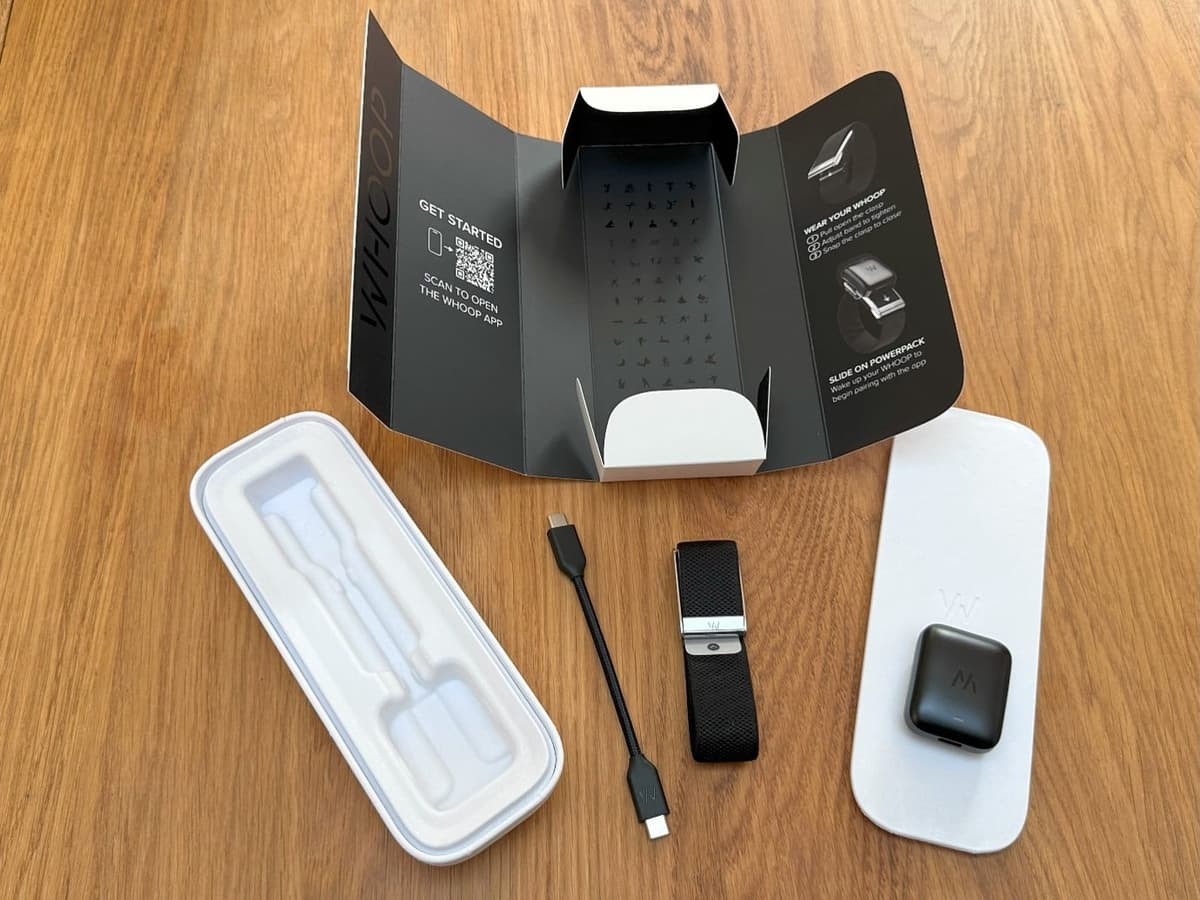
Given the lack of a display, gathered metrics and their interpretation are accessible via the Whoop app, which runs on a partner smartphone, or via a browser on a PC.
The Whoop device automatically detects different types of activity. For example, it knows if I am running, cycling or swimming. If it fails to detect the activity, it will ask in the app what I was doing, enabling me to pick from a huge range of exercise types. The device does not have a GPS receiver, so it doesn’t know how far you have run or cycled, although it does track steps. You can also tell it that you are about to do an activity via the app, but I rarely remember to do this and always forget to tell it when I am done, so I just let it track my activities automatically.
For strength exercises, the Whoop device will capture the movement, but the user must enter the specific type of exercise and the weight used to accurately assess the ‘strain’.
You can also tell the device you are doing a non-exercise activity, such as public speaking or having a massage, which may respectively be high stress or aid recovery.
The Whoop app
All the information gathered by the device is shown within the Whoop application, which runs on a partner smartphone. You can also access the same information in a web browser.
The app can integrate with other health tracking applications, such as Apple Health, Strava and TrainingPeaks. This enables bidirectional data sharing, meaning it can pull in health metrics such as weight from a partner app, and also share information on activities undertaken.
And I have to say that the app is superb – with copious amounts of data and insights, plus supportive articles, plans and more.
Metrics
The primary metrics that the Whoop application tracks are what it calls “strain” and “sleep”, and it then reports a recovery score.
The theory behind improving fitness is fairly straightforward – you stress the body, perhaps pushing it further than has been done previously, you then rest and the body will both recover and adapt to the physical stress. To improve fitness, you need to have both the stimulus – physical stress, and the recovery. If you provide an excess of physical stress without providing adequate chance for recovery, the body will struggle to adapt and it may lead to things such as fatigue, illness, disrupted sleep and disturbed mental states. Whoop aims to assist with all of these aspects.
Strain – more than exercise
Strain is a metric that Whoop uses to assess the user’s level of both physical and mental stress. Strain may come from structured physical exercise, such as running or cycling, or from other activities such as chasing the kids in the park, doing chores around the house, or delivering a presentation at a seminar. All will generate a level of stress on the body that Whoop picks up from variations in heart and respiratory rates and reports as part of the strain metric.
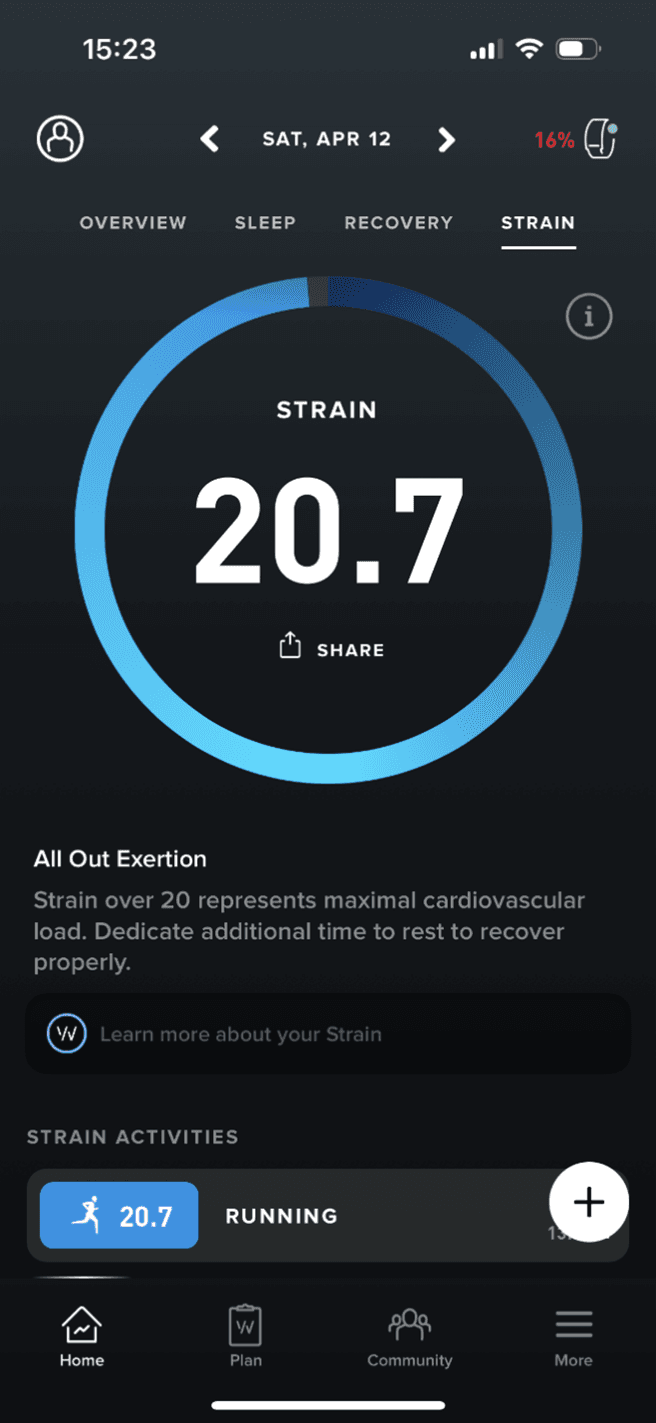
The strain scale runs from 0 to 21, with 1 to 9 being low strain, 10-13 representing moderate strain, 14-17 high strain, and 18-21 described as overreaching.
Strain is a logarithmic scale and it is impossible to exceed 21. The rating is also not additive, so if you do two activities that score a 10, you won’t be given a strain score of 20. The maximum strain I have achieved is 20.7 after many hours of significant physical activity, such as four or five hours of rapid cycling, and running a marathon.
Sleep – the key to life…and recovery
Sleep performance is a vital metric for recovery and for life in general. Many people rarely get sufficient sleep and short-changing sleep is a recipe for a whole host of issues, from feeling lethargic to a suppressed immune system to even exacerbating symptoms of diabetes. In short, sleep is the foundation of good health.
Whoop calculates the amount of sleep needed based on the strain level recorded during the day, as well as the recovery level from previous days. It then measures sleep performance by assessing the duration of sleep and time in different sleep stages.
As with all consumer wearables, sleep performance is an approximation based on the metrics it can gather. Real sleep tracking can only be done using electrodes attached to the scalp, but this is not practicable for regular monitoring, or outside of a sleep lab.
Recovery – where the magic happens
Whoop reports a recovery score after waking. The score shows how well your body has managed strain from the previous days and how ready you are to cope with further strain-based activities. The recovery score is represented as a percentage and a color is assigned to the score. If your recovery score is above 67%, it is a green day and you can train as hard as you wish. A score between 34% and 66% is marked as yellow. This shows that you are partially recovered and that you should train moderately. A score of 33% or lower will be marked as a red day, and when this occurs, you are advised to rest fully or do minimal activity.
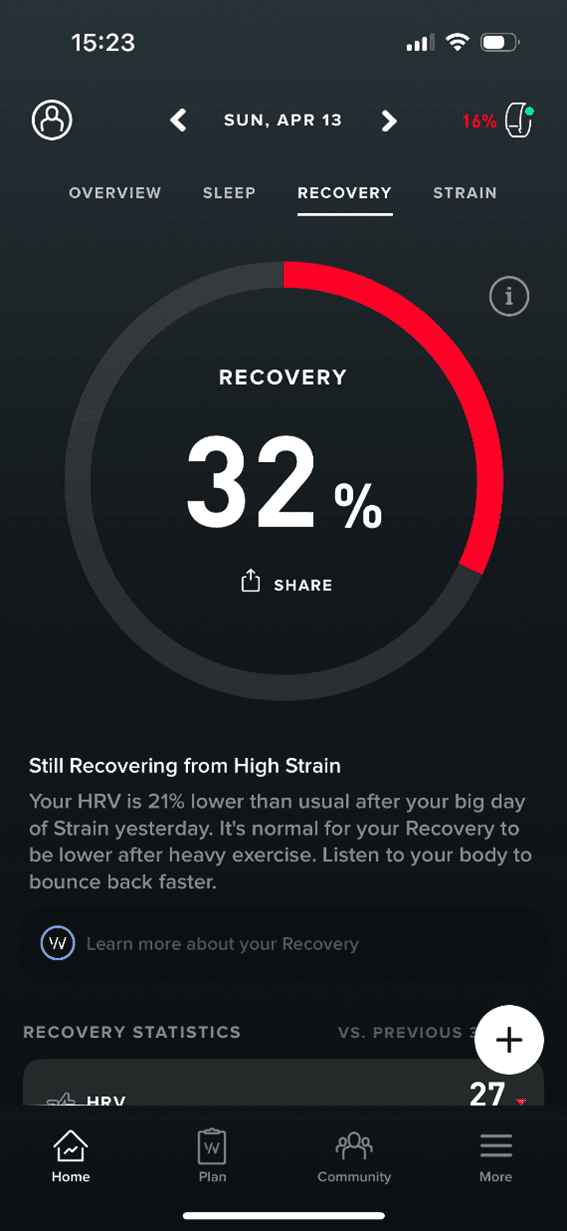
Recovery scores are calculated using a mix of data such as heart rate variability (HRV), resting heart rate, sleep performance and respiratory rate.
HRV is a measure of the autonomic nervous system. When you start wearing a Whoop, there is a period when the system is learning what the baseline actually is. Some people have relatively high HRV, while for others it is lower. But for everyone, a drop in HRV can signify an issue, like fighting an infection, even if you are not consciously aware of it. Often, people who track HRV will notice a drop one or two days before showing symptoms of an infection, so it is a key metric to pay attention to.
Health Monitor
The Health Monitor section in the Whoop app includes a dashboard of five health markers – respiratory rate, blood oxygenation, resting heart rate, heart rate variability and skin temperature. It shows at a glance if these are in range. For women, Whoop also offers personalized guidance built around menstrual cycles.
With the Whoop 5, the app also offers an interesting twist to health metrics in something called Healthspan. This shows an estimation of your physical age – or Whoop age, as Whoop calls it – compared to your chronological age. In addition, it shows your pace of ageing. A 1.0x pace of aging would mean your Whoop age and chronological age are progressing at the same rate. Living a wild life with excessive partying and lots of stress can accelerate your pace of aging to greater than your pace of chronological aging. And conversely, if you live well, get sufficient sleep and enough, but not too much, physical exercise, you can slow your notional pace of aging. Whoop calibrates the pace of aging from -1.0x to +3.0x.

The app also breaks down the components to show which behaviors are contributing to accelerating or decelerating your pace of aging. It’s a neat nudge to forego that extra glass of wine and go for a brisk walk, or get more sleep, instead.
I am not sure if taken to extremes, whether it implies you can continue to cheat the aging process ad infinitum, but there are many who are investing billions in trying to address the aging process. Whoop here nudges you to do the right things.
Feeling the pressure
Tracking blood pressure unobtrusively is something of a holy grail for wearable manufacturers. Whoop is attempting it with its latest device. It is in beta for now and Whoop is encouraging users to become part of the experiment to gather data to further improve its analysis of this key health marker.
The first step is to provide three blood pressure measurements from a cuff-based blood pressure monitor to act as a baseline. Once this is done, Whoop estimates blood pressure through the optical sensors in the device. It does this during sleep when there is the least amount of noise in the samples it gathers.
It took me a while to gather the cuff-based samples, but I have been receiving the estimated readings for a few weeks now. These have not deviated much from the average of my cuff-based readings, and it is hard to know how much of this is an assumption-based approach, or if there is real interpretation of signals going on here. Nevertheless, in the past, I rarely used the cuff-based blood pressure monitor, so having a simple and unobtrusive way to keep a check on this critical health marker is welcome.
Coaching and support
In addition to the metrics, the app is also a base for supporting the user. There is a range of coaching plans covering things like weight management, fitness boost, sleep improvement, or simply feeling better. You can also build a custom plan based on tracking a range of metrics.
The app provides nudges, such as suggesting an appropriate time to go to bed to achieve the required amount of sleep. This happens quite subtly as notifications on the partner phone.
The app also provides access to multiple articles, podcasts and more to help users understand good practices across different spheres of health and wellness.
Journaling
To keep track of your progress, you are encouraged to keep a journal of what you do each day – again, this can be tailored by the user.
Communities
Users can join different communities or teams based on their location or interest. However, these just seem to be a list of the users with the highest strain levels, which may actually be counterproductive.
Business model – members only
Whoop’s business model is membership-based, with the device provided as part of the membership fee, which is charged annually. Whoop commits to upgrading the device when a new one is released, although given the recent release of the fifth-generation hardware, it is unlikely there will be another upgrade anytime soon. The devices have lifetime warranties.
There are various accessories, such as different band types and colors, and clothing that can accommodate the Whoop device. Investing in these likely makes the experience stickier for participants.
It is possible to trial the service for free for one month, although the device provided is a pre-owned one and the real insights only start to accumulate with extended use.
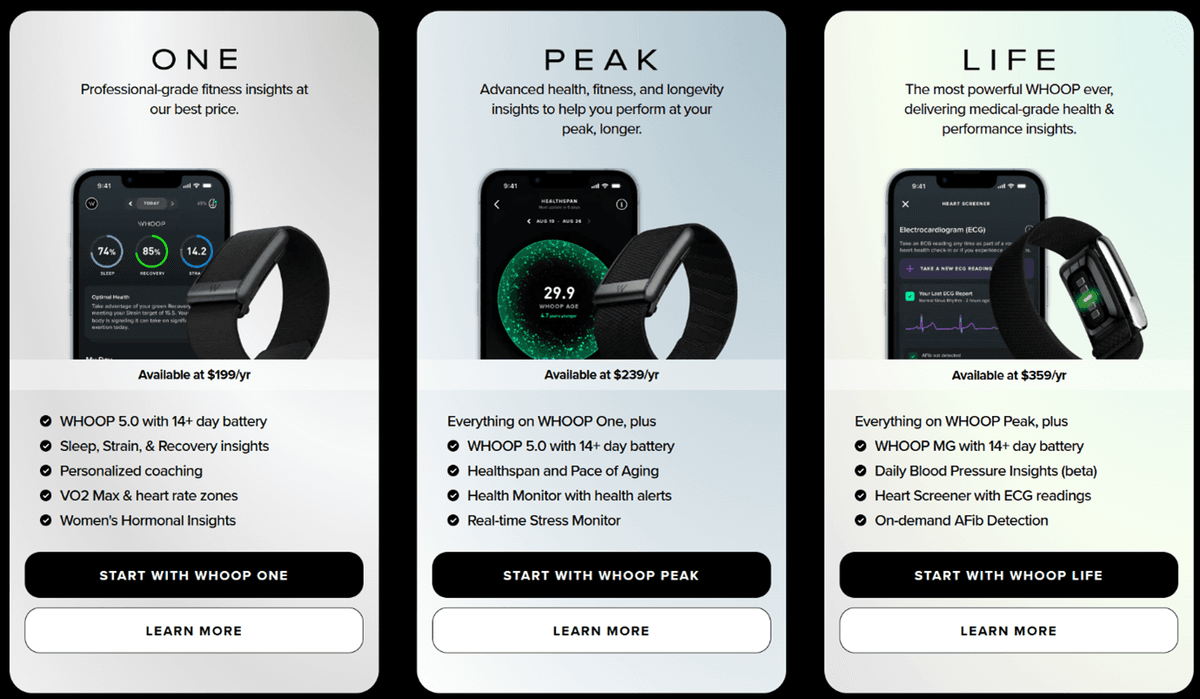
There are essentially three pricing options – running from $199 per year, rising to $239 per year and peaking at $359 per year. In the US, some of the cost can be offset by healthcare plans.
Whoop is also working on something it calls Whoop Advanced Labs, which will include blood tests that deliver insights gathered across 60+ biomarkers. Results and related coaching will be delivered in the app. This will initially be offered in the US, with other countries progressively added.
Whoop promotes itself through above-the-line advertising as well as an influencer program that includes people like footballer Cristiano Ronaldo, golf Masters tournament winner Rory McIlroy, professional cyclist Mathieu Van Der Poel, Olympic athlete Sha’Carri Richardson, and Michael Phelps, the most successful Olympic swimmer of all time. To underscore that this is not just a sports device, music artists and chefs are also included in the program.
How does it stack up against an athletic watch?
The key question is what it is like to use and does it offer something more than, for example, Garmin’s sports watches or Apple Watch and Apple Health.
If you only have an Apple Watch, then Whoop would be an excellent addition. Apple Watch is a popular watch, but for a long time, Apple did not provide any sort of recovery metrics. With the introduction of watchOS 11 in 2024, Apple introduced something called Vitals, which tracks various health indicators while the user is sleeping. These include heart rate, respiratory rate, wrist temperature, sleep duration and blood oxygen levels. If two or more of these metrics are out of the normal range, the Watch will notify the user.
In another addition, Apple Watch now tracks exercise load longitudinally to provide a measure of progression over time in training intensity. Also, with watchOS 26, Apple is introducing more personalized coaching. So, while Apple is improving ways to support training activities, it is still not addressing recovery in the way that Whoop does, nor does it offer a Body Battery or Readiness to Train score like Garmin does. For this, Apple Watch users have to rely on third-party apps like Athlytic or Wellhero.
So, in this case, partnering an Apple Watch with a Whoop device would provide an enhanced understanding of strain and recovery – especially as the poor battery life of Apple Watch means that it is often being recharged at night and is therefore unavailable to record sleep and other recovery metrics even if the Vitals app is a step in the right direction.
However, for users of Garmin’s range of athletic watches, Whoop does not add significant new information or insights. Furthermore, I find the Whoop device does a relatively poor job of measuring heart rate in certain situations. I use a heart-rate chest strap with my Garmin watch as a benchmark for accurate heart-rate measurement. Comparing data across activities, I find significant disparity when the activity involves a lot of arm movement – for example, when running. This then feeds through to inaccurately assessing the strain of a given activity. For example, in a recent run, my Garmin recorded an average heart rate of 149bpm and a high of 171bpm. The Whoop recorded an average of 157bpm and a high of 178bpm. The distribution of time at different heart rates was also significantly different. A few days later, I did another activity where my Garmin measured my average heart rate as 118bpm with a peak of 166bpm, while the Whoop recorded the same activity with a 146bpm average and a peak of 186bpm. A significant delta on both metrics.
However, for activities where I am not moving much, such as pedaling on my stationary bike, Whoop does a much better job. For example, in a recent cycling workout, my Garmin recorded an average of 143bpm and a peak of 157bpm, versus Whoop’s 142bpm and 157bpm – virtually identical. So, it seems to be the movement that throws off the measurement accuracy. And to be completely fair, when using my Garmin watch’s own wrist-based heart rate measurement, it can also be inaccurate.
Other areas where Garmin and Whoop differ are metrics like HRV, but here it could be down to the specific type of measurement. What I do notice is that the directional trends are the same. Similarly, sleep scores are also fairly well aligned across both platforms, even if some of the specifics are a little different.
However, Garmin’s suite of metrics and richness of data capture during activities is greater than Whoop’s. And the two key Garmin metrics that are similar to Whoop’s recovery score – Body Battery and Readiness to Train – seem to me more intuitive and are handily presented on the watch’s display; I don’t need to open a smartphone app. So, Whoop adds little to what Garmin provides. And importantly, beyond the cost of the Garmin watch, which can range from a few hundred to a few thousand dollars, there is nothing more to pay to continuously receive a large stream of health data, as well as access to training plans and more. While I have not tried them, athletic watches from companies like Suunto, Polar and Coros also provide comprehensive recovery metrics.
And yet, having said all this, I do find myself spending much more time in the Whoop app than the Garmin app. And this is the key difference – where Garmin is primarily focused on supporting sporting activities, Whoop is primarily focused on the user’s broader health. This is a subtle but important distinction.
Another aspect that Whoop has in its favor is that it is more comfortable to wear during sleep than a full smartwatch. In this respect, it is similar to a smart ring, which is even more unobtrusive to wear.
Competing products
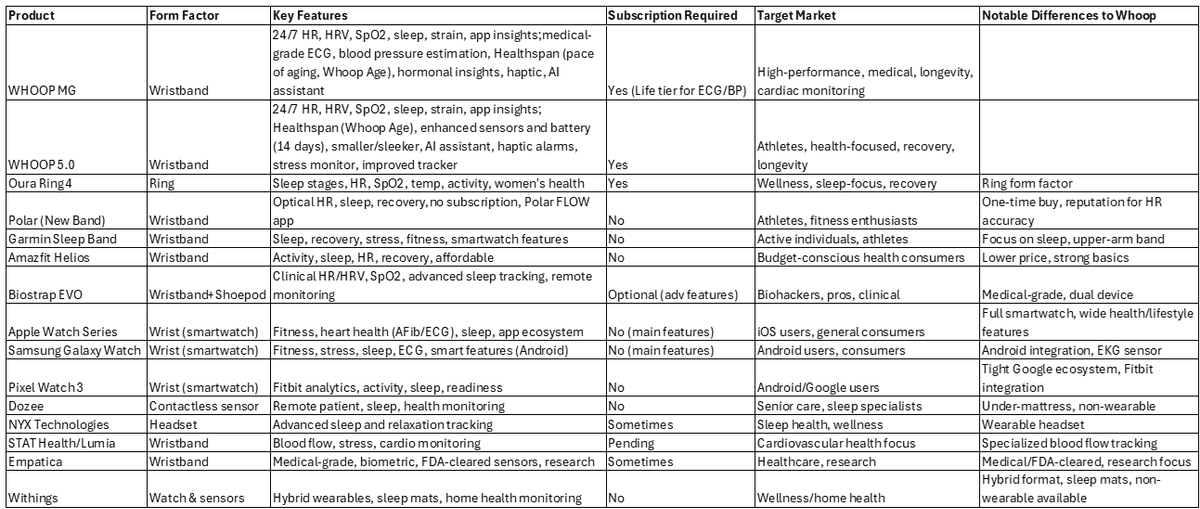
While the form factor is superficially similar to smartwatches, Whoop competes more directly with the ring form factor due to the lack of a display. However, there is a growing range of devices that have functional overlaps with Whoop. Here, we summarize some of the more prominent as well as lesser-known rival devices.
Conclusion
To sum up, Whoop offers something different than athletic watches. Its focus on recovery and broader health is refreshing and sets it apart from most athletic watch-based trackers, although it has perhaps more in common with smart rings.
The fifth-generation hardware is extremely power-efficient, so charging is now a rare occurrence. And the MG version and premium subscription provide a number of features that few other wearables currently offer.
On the downside, its heart rate tracking accuracy when doing vigorous activity is questionable, leading to potentially misreading the level of strain. And superficially, Whoop doesn’t seem to offer anything more than many athletic watches in terms of tracking health and recovery metrics, but does much less in terms of tracking sports activities. Also, once over the hump of paying for an athletic watch, all of the metrics are free for the life of the watch.
The Whoop MG device does provide some extras that are not generally provided by athletic watches – such as ECG, atrial fibrillation detection and blood pressure estimation, though Apple Watch provides for the first two.
Where Whoop is potentially valuable is to the many millions of Apple Watch users. At the time of writing, Apple Watch still doesn’t offer the full suite of recovery metrics that other athletic watches provide. Also, Apple Watch continues to suffer from poor battery life, which means it is difficult to use for tracking sleep and other health metrics. So, in this case, I would recommend Whoop. However, should Apple address the battery life issue and start providing a more rounded set of recovery metrics, the case for Whoop would start to look marginal.
